Axle Weight Calculator
Enter the empty weights, distances and where the load sits to see the weight on each axle group and whether it is within limits.
At a glance
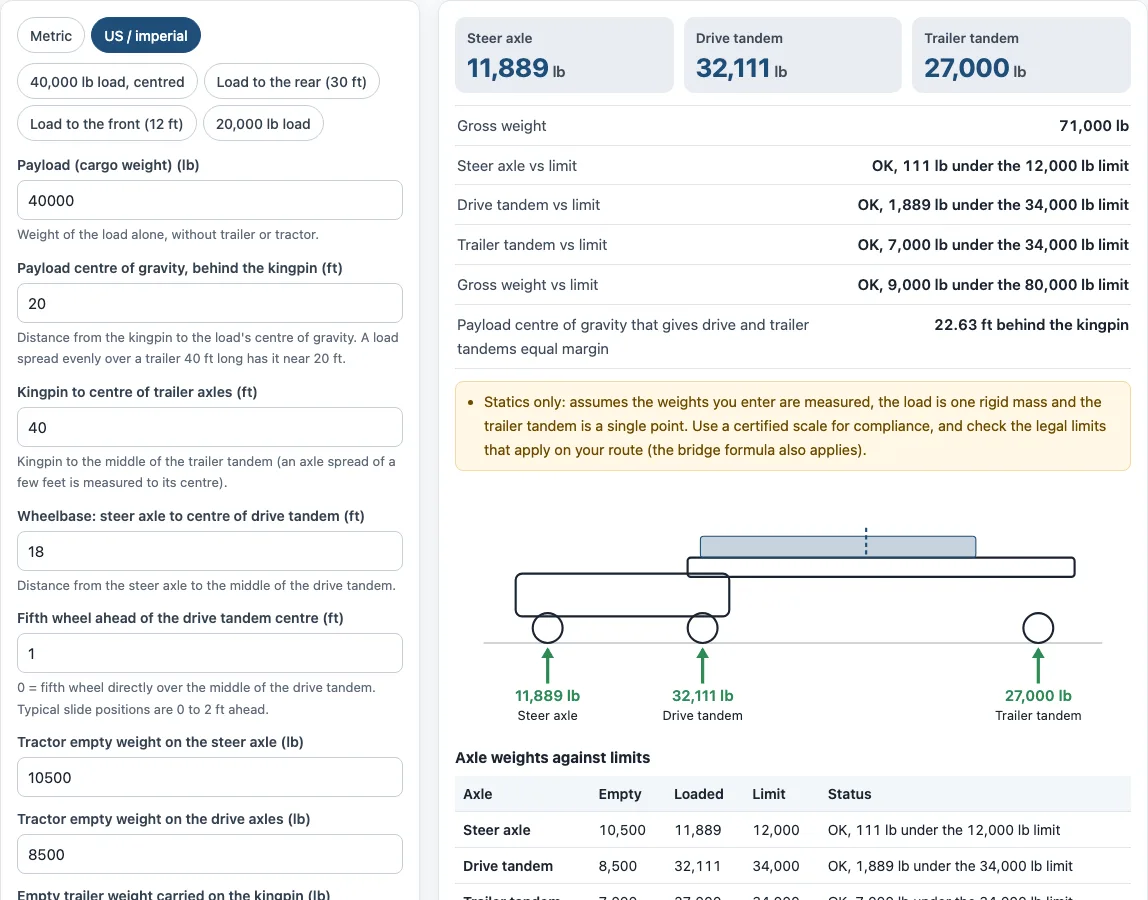
Axle Weight Calculator estimates how a tractor and semi-trailer load spreads across steer, drive and trailer axles, checking each against its limit, for a free browser-based tool.
- Shows steer, drive and trailer axle totals with each margin under its limit, checked against 34,000 and 80,000 lb.
- The steer axle default limit is 12,000 lb, and every limit is editable under More options.
- Example: a 40,000 lb load centred 20 ft behind the kingpin puts 20,000 lb on the trailer tandem.
- The default example's balance point is 22.63 ft behind the kingpin, where each tandem has equal margin.
- Free, runs in the browser, needs no account or sign-up, and uploads nothing you type.
- Gives a statics estimate only, not a legal weigh-in, and does not run the bridge formula.
Sources: Axle weight (Wikipedia) (checked 2026-10-15) · 23 CFR 658.17 Weight (eCFR) (checked 2026-10-15) · Bridge Formula Weights (FHWA Freight Management and Operations) (checked 2026-10-15)
How to use the Axle Weight Calculator
- Pick a unit system with the Unit switch: “Metric” or “US / imperial”.
- Enter the payload, which is the weight of the cargo alone, without the trailer or tractor.
- Enter the payload centre of gravity, measured behind the kingpin. A load spread evenly over a 40 ft trailer sits near 20 ft.
- Enter the kingpin to centre of trailer axles distance. For a tandem spread, measure to its centre.
- Enter the wheelbase, from the steer axle to the centre of the drive tandem.
- Enter the fifth wheel distance ahead of the drive tandem centre. Enter 0 if it sits directly over the middle.
- Enter the tractor empty weights on the steer axle and on the drive axles.
- Enter the empty trailer weight carried on the kingpin and on the trailer axles. Take these from a scale ticket of the empty trailer.
- Open “More options” to set the steer axle, drive tandem, trailer tandem and gross weight limits.
- Read the axle totals, the “vs limit” lines and the payload centre of gravity that gives the drive and trailer tandems equal margin.
To test a common setup quickly, use a preset button: “40,000 lb load, centred”, “Load to the rear (30 ft)”, “Load to the front (12 ft)” or “20,000 lb load”. “Reset” restores the example values.
“Print / save result” makes a one-page sheet with your inputs, results, steps and the date, “Copy link” copies a link that reopens the same inputs, and “How it was calculated” lists each step with your numbers.
How do you calculate axle weight on a semi truck?
The calculator treats the trailer and the tractor as beams and uses moments (statics) about a pivot point. First it finds the payload share on the trailer tandem: payload × (distance of its centre behind the kingpin) ÷ (kingpin to trailer tandem centre). The rest of the payload sits on the kingpin. With 40,000 lb centred 20 ft behind the kingpin over a 40 ft spread, 20,000 lb goes on the trailer tandem and 20,000 lb on the kingpin.
The kingpin load is then split between the steer axle and the drive tandem. The steer share is kingpin load × fifth wheel distance ahead of the drive tandem ÷ wheelbase, and the rest goes on the drive tandem. Each empty weight is added to its axle. In the example, 25,000 lb on the fifth wheel gives 1,389 lb to the steer share and 23,611 lb to the drive share.
How does moving the fifth wheel change axle weights?
Sliding the fifth wheel forward moves weight from the drive axles to the steer axle. Sliding it back does the opposite. The steer share changes by the kingpin load divided by the wheelbase for each foot of movement. With the default 25,000 lb kingpin load and an 18 ft wheelbase, each foot forward moves about 1,389 lb onto the steer axle.
What are the legal axle weight limits?
In the US, federal limits on the Interstate system are 20,000 lb for a single axle, 34,000 lb for a tandem and 80,000 lb gross (23 U.S.C. 127). The steer axle limit of 12,000 lb is the tool’s default. The steer limit is usually set by tyre and axle ratings and by state rules, so check the rules for your route. Every limit in the tool is editable under “More options”, so you can enter the ones that apply to your trip.
Where should the load sit on a trailer?
Place the load where the drive and trailer tandems have the same margin under their limits. The tool calculates this position for you. In the default example, a centred load at 20 ft leaves the drive tandem 1,889 lb under its limit and the trailer tandem 7,000 lb under. The balance point is 22.63 ft behind the kingpin, where each tandem sits 4,371 lb under its limit. Moving the load further back shifts weight from the drive tandem to the trailer tandem.
How do I balance the drive and trailer axles?
Balance the tandems with the load position or with the trailer tandem position. Both change how weight splits between them.
- Check the “vs limit” lines to see which tandem has less margin.
- If the drive tandem is closer to its limit, move the payload centre further back behind the kingpin. This moves weight onto the trailer tandem.
- If the trailer tandem is closer to its limit, move the payload centre forward.
- Or slide the trailer tandem. Moving it toward the kingpin raises the trailer tandem share, because the same payload distance is divided by a shorter spacing. Moving it back lowers that share.
- Repeat until the tool’s balance point and your planned position agree.
Sources
Data and rules used by this tool (checked October 2026):
Frequently asked questions
Can I use these results for a legal weigh-in?
No. The tool gives a statics estimate only. Weigh the loaded rig on a certified scale, and remember that the bridge formula also applies. The axle weight calculator does not run the bridge formula, so use the bridge formula calculator for that check.
Are the numbers I type uploaded anywhere?
No. The tool runs in your browser, and nothing you type is uploaded. It is free, and you do not need an account or sign-up.
Can I use the results in quotes, invoices or shipping plans?
Yes. Results may be used in commercial work such as quotes, invoices and shipping plans without attribution.
What if my state’s limits differ from the defaults?
Change them under “More options”. The steer axle default is 12,000 lb, but state rules and tyre and axle ratings may set a different figure. Enter the limits that apply to your route, and the “vs limit” results will update.
How do I share or save a load plan?
Use “Copy link” to share a link that reopens the same inputs. Use “Print / save result” to make a one-page sheet with the inputs, results, calculation steps and date, then save it as a PDF from the print dialog.
Related tools
- Trucking cost per mile calculator: use it to estimate what a trip costs per mile before you plan the load.
- Fuel surcharge calculator: use it to work out the surcharge on a shipment when fuel prices change.
- IFTA calculator: use it to split fuel tax reporting across the states you drive through.
- Truck driver pay calculator: use it to estimate driver pay for a set of miles or hours.
- Bridge formula calculator: use it to check a truck’s axle spacing and weights against the bridge formula.
- Truck loading calculator: use it to plan how cargo fits inside the trailer before you set the payload position.