1 CBM to KG Calculator
Enter a volume in cubic meters to see its chargeable weight in kg for each transport mode, or its real weight from the cargo density.
At a glance
1 CBM to KG Calculator converts cubic metres into chargeable kilograms for sea, road, air and express freight, or into actual weight from density. Free, runs in your browser, needs no sign-up.
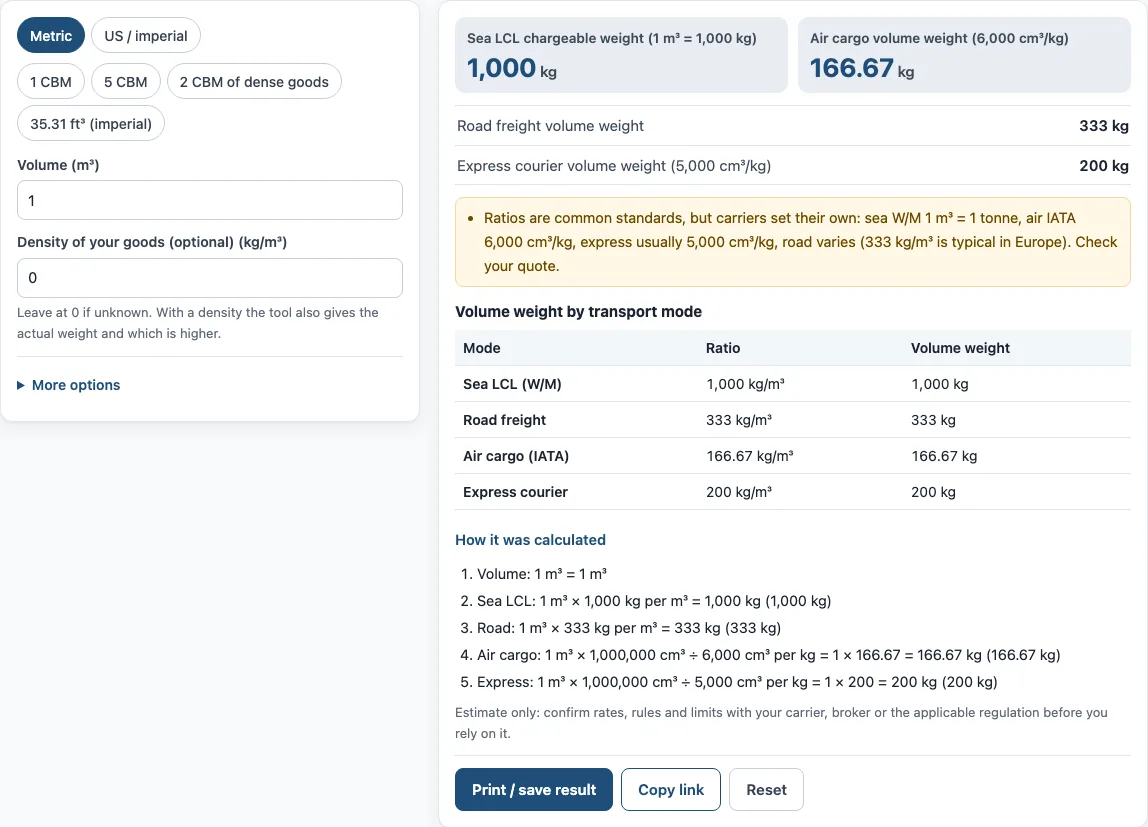
- With default values, 1 CBM gives 1,000 kg for sea LCL.
- The road freight default is 333 kg per m³, the common European ratio.
- Air cargo uses 6,000 cm³ per kg, so 1 CBM gives 166.67 kg.
- Express courier uses 5,000 cm³ per kg, so 1 CBM gives 200 kg.
- The tool is free, runs in the browser, and needs no account or sign-up.
- A cubic metre has no fixed weight; the result depends on the mode ratio or goods density.
Sources: Dimensional weight (Wikipedia) (checked 2026-10-15)
How to use the CBM to kg converter
- Choose your unit system with the switch: “Metric” or “US / imperial”. Typed values convert when you switch, so set the unit before you type.
- Enter the Volume in m³ (or ft³ in imperial mode). To fill in a common value, press a preset: “1 CBM”, “5 CBM”, “2 CBM of dense goods” or “35.31 ft³ (imperial)”.
- Optional: enter the Density of your goods in kg/m³ (or lb/ft³). Leave it at 0 if you don’t know it. With a density, the tool also shows the actual weight and which is higher.
- Open “More options” and check the Road freight ratio. The default is 333 kg per m³, the common European road ratio. Carriers vary, so edit it to match your quote.
- Read the results: Sea LCL chargeable weight, Air cargo volume weight, Road freight volume weight and Express courier volume weight. If you entered a density, you also see Actual weight from density, plus the Sea and Air chargeable weights.
- Open “How it was calculated” under the result to see each step with your own numbers.
Press “Print / save result” to get a one-page sheet with your inputs, results, calculation steps and the date. You can save it as a PDF from the print dialog. “Copy link” copies a link that reopens the same inputs, and the page address keeps your inputs after any change. “Reset” restores the example values.
How many kg is 1 CBM?
A cubic metre is a volume, so it has no fixed weight. Its weight depends on the ratio the carrier applies or on what is inside the box. Using the tool’s ratios, 1 CBM is 1,000 kg for sea LCL, 333 kg for road freight in Europe, 166.67 kg for air cargo and 200 kg for express courier.
To find the actual weight of the goods instead, multiply density by volume: kg = density (kg/m³) × volume (m³). For example, 1 m³ of goods at 500 kg/m³ weighs 500 kg.
How do you convert CBM to kg for air freight?
Air cargo uses 6,000 cm³ per kg. Since 1 m³ is 1,000,000 cm³, the formula is kg = m³ × 1,000,000 ÷ 6,000, which equals m³ × 166.67. So 1 CBM gives 166.67 kg, and 2 CBM gives 333.33 kg.
Compare this volume weight with the actual weight. Carriers charge the higher of the two. Express courier uses 5,000 cm³ per kg, so the same 1 CBM gives 200 kg by that method.
What is 1 CBM in sea freight?
For sea LCL, the tool uses 1 m³ = 1,000 kg. In other words, 1 CBM counts as 1,000 kg, or one metric tonne. This is why CBM to MT (metric tonnes) is one-for-one for sea weight-or-measure cargo.
Sea chargeable weight is the higher of the actual weight and the volume weight. In imperial mode, the volume is in ft³ and weights are in lb, where 1 kg = 2.20462 lb. One cubic metre is about 35.31 ft³, which is the imperial preset.
Why do road, air and sea use different ratios?
Each mode uses its own ratio, so the same cube can produce different chargeable weights. Air uses 6,000 cm³ per kg, a standard set by IATA. Road ratios are set by each carrier: DHL describes 1:3 (333 kg per m³) as the usual inland ratio and notes that ratios vary by carrier and location. Sea LCL uses 1,000 kg per m³.
A ratio is a pricing rule. It sets how many kilograms one cubic metre is charged as, and it differs by mode and carrier. Light, bulky cargo often reaches a volume limit before a weight limit, which is why volume-based ratios matter. Check the ratio for the mode you will actually use.
Sources
Data and rules used by this tool (checked October 2026):
Frequently asked questions
Is 1 CBM the same as 1 tonne?
Only for sea LCL in this tool, where 1 m³ = 1,000 kg, which equals one metric tonne. Air, road and express use different ratios, so one cubic metre is not one tonne in those modes.
What if I don’t know the density of my goods?
Leave the Density at 0. The tool then shows only the volume-based weights for each mode. These are useful for a chargeable weight estimate, but they do not tell you the actual weight of the goods.
Why does my carrier’s quote differ from the tool?
Carriers set their own ratios and rules. Edit the road freight ratio under “More options” to match your quote, and compare the air and sea figures with the rules your carrier gives you.
Can I use the results on an invoice or shipping plan?
Yes. Results may be used in commercial work, such as quotes, invoices and shipping plans, without attribution. The tool’s note still applies: it is an estimate, so confirm rates, rules and limits with your carrier, broker or the applicable regulation before you rely on it.
Does the tool upload the numbers I type?
No. The tool runs in your browser, and nothing you type is uploaded.
Related tools
- CBM calculator: use it to work out the cubic metres of a box or load before you convert to weight.
- CBM to CFT converter: use it when your volume is in cubic feet (CFT) and you need cubic metres.
- Cubic feet calculator for shipping: use it to measure shipment volume in cubic feet.
- Dimensional weight calculator: use it to find the dimensional weight of a parcel from its length, width and height.
- Chargeable weight calculator: use it to compare actual and volume weight and find the chargeable weight.
- Freight class calculator: use it to find the freight class that applies to your shipment.