Chargeable Weight Calculator
Enter the pieces of an air cargo shipment to get its volume weight, gross weight and the chargeable weight the airline bills.
The Chargeable Weight Calculator works out the chargeable weight of an air freight shipment, which is the greater of its actual (gross) weight and its volume (dimensional) weight. You enter the size and weight of each piece, and it shows which figure an airline or forwarder would bill, along with the volume weight, total volume and your cargo density.
The tool runs in your browser. It is free, needs no account or sign-up, and does not upload what you type.
It uses the standard air cargo ratio of 6,000 cm³ per kg by default. You can switch to the 5,000 cm³ per kg ratio used by express couriers, or to the road and sea LCL ratios. Results are estimates, so check rates and rules with your carrier or broker before you rely on them.
At a glance
Chargeable Weight Calculator works out the chargeable weight of air freight shipments, the greater of actual gross weight and volume weight, using 6,000 cm³ per kg by default, running in your browser.
- The tool calculates air freight chargeable weight, the greater of gross weight and volume weight.
- Volume weight uses 6,000 cm³ per kg by default, the standard air cargo ratio.
- Users can switch to 5,000 cm³ per kg for express couriers, or to road and sea LCL ratios.
- Chargeable weight is rounded up to the next 0.5 kg; with pounds, to the next whole pound.
- The tool is free, needs no account or sign-up, and does not upload what you type.
Sources: Dimensional weight (Wikipedia) (checked 2026-10-15)
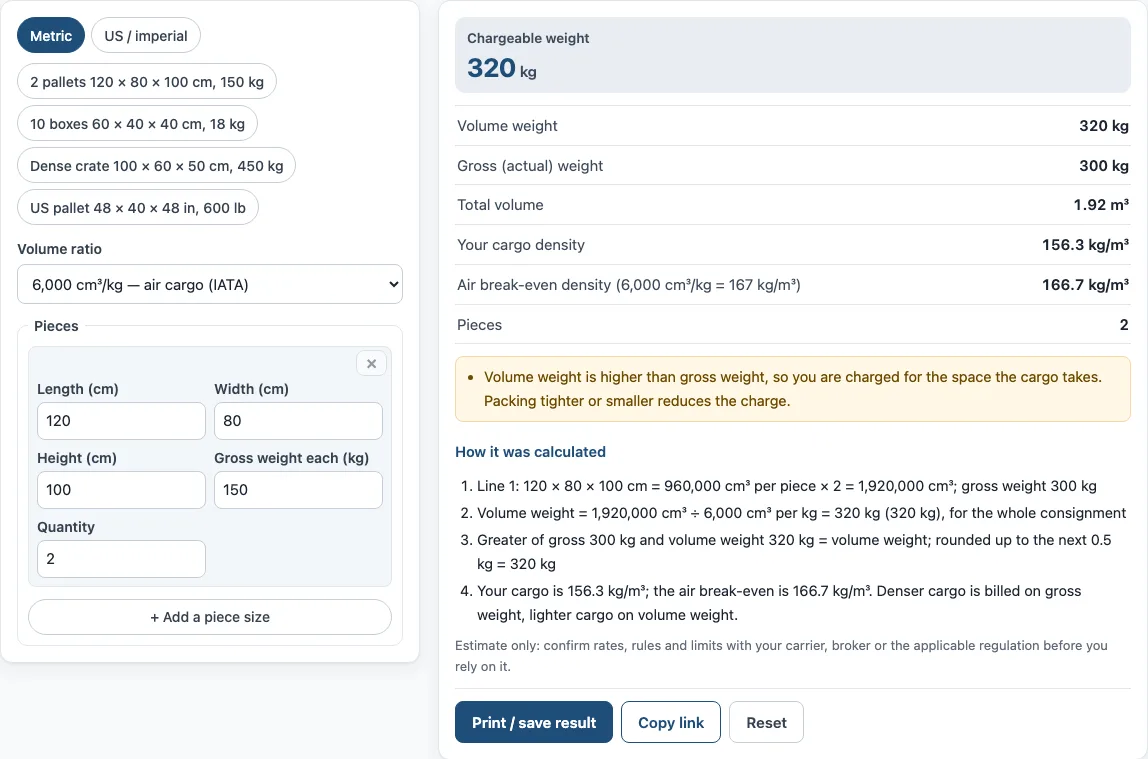
How to use the Chargeable Weight Calculator
- Choose your unit with the switch: “Metric” or “US / imperial”. Any values you have already typed are converted when you switch.
- Open the volume ratio list and pick the ratio that matches your carrier. “6,000 cm³/kg — air cargo (IATA)” is the standard for air freight. Use “5,000 cm³/kg — express / courier” for courier services.
- In the Pieces section, enter the Length, Width and Height of the first piece, then its Gross weight each.
- Enter the Quantity of identical pieces.
- Click “+ Add a piece size” to add a line for a different size of piece. Click × to remove a line.
- Read the results: Chargeable weight, Volume weight, Gross (actual) weight, Total volume, Your cargo density, Air break-even density, and Pieces.
- Open “How it was calculated” under the result to see each step with your own numbers.
To start from a sample, click one of the four preset buttons. “Reset” restores the example values.
To keep your work, click “Copy link” to copy a link that reopens the same inputs, or use “Print / save result”. The print sheet includes your inputs, results, calculation steps and the date. To save it as a PDF, choose the PDF option in the print dialog.
How is air freight chargeable weight calculated?
Air freight chargeable weight is the greater of the gross weight and the volume weight of the whole shipment. To find the volume weight, multiply the length, width and height of each piece in centimetres to get its volume in cm³, multiply by the number of identical pieces, then divide by 6,000.
In the default example, two pallets measure 120 × 80 × 100 cm. Each pallet is 960,000 cm³, so the two together are 1,920,000 cm³. Dividing by 6,000 gives 320 kg. The pallets weigh 300 kg gross, so the chargeable weight is 320 kg.
Why is chargeable weight higher than actual weight?
Chargeable weight is higher than actual weight when the cargo is light for the space it takes up. An aircraft’s hold has limited volume, so bulky, lightweight goods can use more space than their weight suggests. The volume weight then becomes the figure that is billed.
Dense cargo, such as a heavy metal crate, works the other way. Its gross weight is greater than its volume weight, so the gross weight is billed.
What is the 6000 rule in air freight?
The 6000 rule is the standard conversion used for air cargo. Volume is converted to weight by dividing the volume in cm³ by 6,000, which means 1 m³ is treated as 166.67 kg. The IATA standard sets this figure, and it is applied to the whole consignment, not to each piece separately.
Is chargeable weight rounded?
Yes. IATA rounds the chargeable weight up to the next 0.5 kg. When weights are in pounds, the tool rounds up to the next whole pound. In the default example, the figure is exactly 320 kg, so no rounding changes it.
Do couriers use the same ratio?
No. Express couriers usually divide by 5,000 instead of 6,000. This means 1 m³ is treated as 200 kg, so the volume weight is higher and bulky parcels cost more. Choose the 5,000 cm³ per kg option in the tool to check a courier shipment.
Sources
Data and rules used by this tool (checked October 2026):
Frequently asked questions
What is the air break-even density?
The air break-even density is about 167 kg per m³ at the 6,000 ratio. Cargo denser than this is billed on its gross weight, and lighter cargo is billed on its volume weight. The tool shows your cargo density next to this figure, so you can see which side you fall on.
Does the tool upload the sizes and weights I enter?
No. The tool runs in your browser, and nothing you type is uploaded.
Can I use the calculator for road or sea freight?
Yes. The volume ratio list includes road at 3,000 cm³ per kg (1 m³ = 333 kg) and sea LCL at 1,000 cm³ per kg (1 m³ = 1,000 kg). Check which ratio your carrier uses before you rely on the result.
Can I use the results in a quote or invoice?
Yes. Results may be used in commercial work such as quotes, invoices and shipping plans, without attribution. Confirm rates and rules with your carrier, broker or the applicable regulation first.
Does the chargeable weight give me the shipping price?
No. Chargeable weight is only the weight that is billed. The price depends on the rate per kg that your airline or forwarder charges, which the tool does not know.
Related tools
- CBM calculator: use it when you need the cubic metre volume of a load for sea or road freight.
- CBM to CFT converter: use it to convert a volume in cubic metres to cubic feet.
- CBM to kg calculator: use it to turn a volume in cubic metres into a weight in kilograms.
- Cubic feet calculator for shipping: use it to find the cubic feet of a shipment in imperial units.
- Dimensional weight calculator: use it to compare dimensional weight for parcels and other non-air services.
- Freight class calculator: use it to find the freight class for a shipment sent by road.