Container Loading Calculator
Enter the carton size and weight and pick a container to see how many cartons fit and how many containers you need.
The container loading calculator is a free online tool that works out how many identical cartons fit in a shipping container and how many containers you need for a given quantity. It runs in your browser, and you don’t need an account or sign-up to use it.
It covers the common sizes, including 20 ft and 40 ft standard containers, 40 ft high cube, and open top and reefer options, and it also accepts custom inside dimensions. You enter the container’s inside size, your carton size and weight, and the number of boxes to ship. The tool then tries the ways each carton can stand, fills the floor with the best layer, stacks layers to the inside height, and reports the limit that applies. It draws the floor layout and a side view of the layers.
At a glance
Container Loading Calculator is a free browser tool that works out how many identical cartons fit in a shipping container and how many containers a quantity needs.
- The tool is free, runs in your browser, and needs no account or sign-up.
- Container options include 20 ft, 40 ft, 40 ft high cube, open top and reefer, plus custom inside dimensions.
- 40 ft high cube inside dimensions used: 12.032 × 2.352 × 2.698 m (76.4 m³).
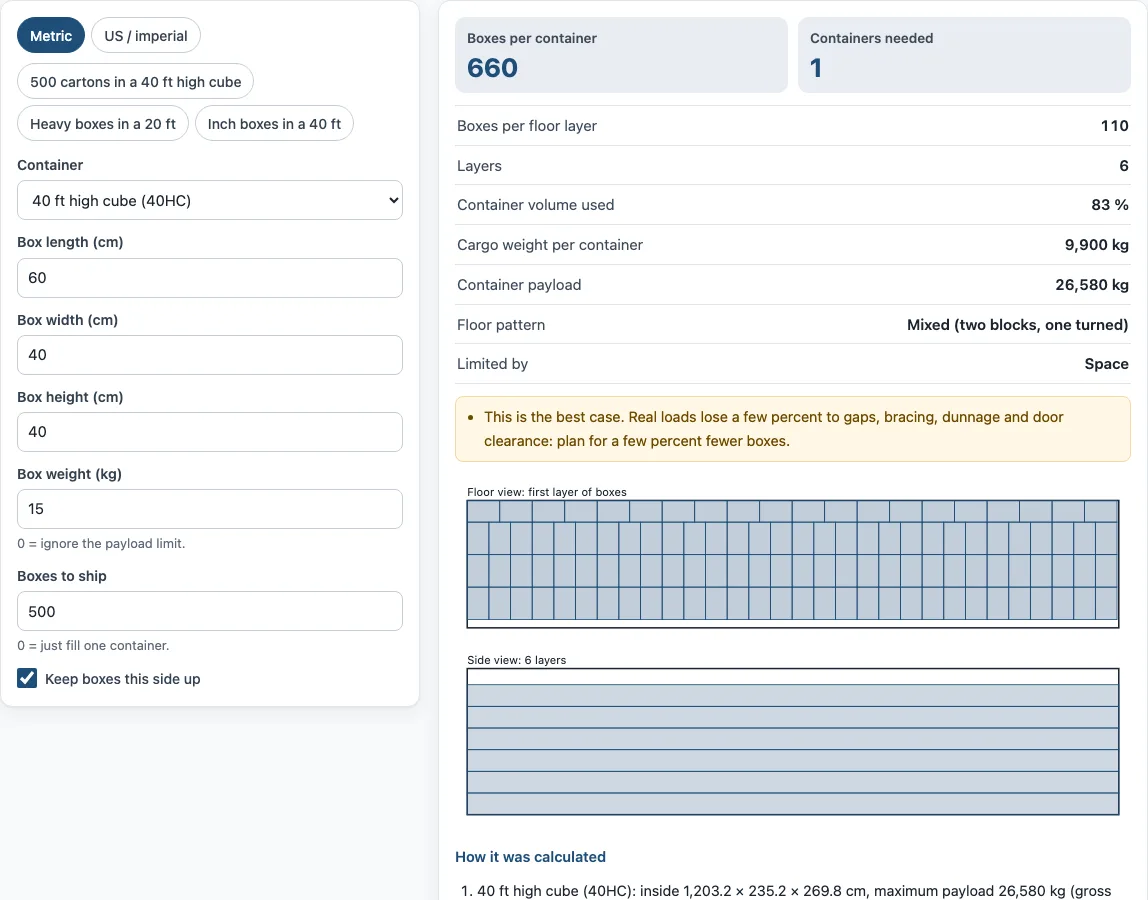
- Default example: 110 boxes per floor layer, 660 boxes per container, 83 % utilisation.
- The smaller of the space count and the payload count sets the boxes per container.
- Nothing you type is uploaded, and results are estimates only.
Sources: Intermodal container (Wikipedia) (checked 2026-10-15) · Dry shipping containers (SeaCube Containers) (checked 2026-10-15)
How to use the container loading calculator
Set the Unit switch to “Metric” or “US / imperial”. Any values you have already typed are converted when you switch.
Choose a Container from the list, such as “40 ft high cube (40HC)”. For a non-standard box, choose “Custom container”.
For the listed containers the tool uses published inside dimensions and payload. If you chose “Custom container”, enter the Inside length, Inside width and Inside height from your carrier’s container data.
For a custom container, also enter the Maximum payload, the most the container can carry.
Enter the Box length, Box width and Box height of one carton.
Enter the Box weight. Set it to 0 to ignore the payload limit.
Enter Boxes to ship. Set it to 0 to see how many fit in one container.
Tick Keep boxes this side up if the cartons must stay upright. Leave it unticked to let the tool try all six orientations.
Read the results: Boxes per container, Containers needed, Limited by, and the rest of the panel.
To start quickly, use a preset button: “500 cartons in a 40 ft high cube”, “Heavy boxes in a 20 ft” or “Inch boxes in a 40 ft”. Reset restores the example values, and Copy link gives a link that reopens the same figures. Print / save result creates a one-page sheet with the inputs, results, calculation steps and date. Choose “Save as PDF” in the print dialog to keep a copy. How it was calculated shows each formula step with your numbers.
How do you calculate how many boxes fit in a container?
Start by finding the number of cartons that fits on the floor, then stack that layer up to the inside height. Take the smaller of the space count and the payload count, then divide the total by the boxes per container to get the number of containers needed.
With the default values in a 40 ft high cube, the best floor layer is 110 boxes, using a 60 × 40 cm footprint with a mixed two-block pattern. The inside height of 269.8 cm divided by the 40 cm box height gives 6 whole layers, so space allows 110 × 6 = 660 boxes. The payload of 28,750 kg divided by 15 kg per box allows 1,916, so space is the limit. For 500 boxes, 500 ÷ 660 rounds up to 1 container.
How many cartons fit in a 20 ft or 40 ft container?
No single number applies, because the count depends on carton size and weight. The tool uses these published inside dimensions (SeaCube container spec sheets): 20 ft standard at 5.898 × 2.352 × 2.393 m (33.2 m³), 40 ft standard at 12.032 × 2.352 × 2.393 m (67.7 m³), and 40 ft high cube at 12.032 × 2.352 × 2.698 m (76.4 m³). Real containers vary, so the CSC plate on the door is the reliable source for the actual inside measurements.
What is a good container utilisation?
Utilisation is the share of the container’s inside volume that your cartons occupy. It is calculated as cartons × carton volume ÷ container volume. There is no universal target, but the figure is an upper limit. Gaps, pallets and door clearance usually take a few percent off what is possible in practice. The default example reaches 83 %.
Can I turn the cartons on their side?
Yes, unless you tick Keep boxes this side up. With that box ticked, the tool only considers the carton upright. With it unticked, the tool tests all six orientations and uses whichever fits the most cartons. Check the carton markings before you load, because the tool cannot see labels or arrows.
What if my cartons are heavy?
Heavy cartons often reach the payload limit before the container is full. The tool divides the maximum payload (maximum gross minus tare) by the box weight and reports the smaller of that count and the space count. The Limited by result shows which one applies. Also check the road weight limit in the country of delivery, which can be lower than the container’s payload.
Sources
Data and rules used by this tool (checked October 2026):
Frequently asked questions
Is the container loading calculator free to use?
Yes. It is free, runs in your browser, and does not need an account or sign-up.
Can I load cartons of different sizes?
No. The tool works out how many identical cartons fit. For a mixed load, run the calculator on your most common carton and treat the result as a rough guide.
Are the results accurate enough for a binding quote?
The results are estimates only. Confirm rates, rules and limits with your carrier, broker or the applicable regulation before you rely on them. Results may be used in quotes, invoices and shipping plans without attribution.
Does the tool upload the numbers I type?
No. Nothing you type is uploaded.
How do I keep a record of a calculation?
Use Print / save result to create a one-page sheet with your inputs, results, calculation steps and the date. Choose “Save as PDF” in the print dialog, or use Copy link to reopen the same inputs later.
Why do real loads fit fewer cartons than the calculator shows?
The count assumes rigid cartons of exactly the size you enter, packed with no gaps. In practice bulging cartons, pallets, dunnage, lashing and the room a forklift or loader needs at the door take a few percent off. Plan with a small margin, or load a test row first.
Related tools
- Pallet calculator: use it to work out how many pallets fit on a floor or in a load before you size a container.
- Pallets in a container: use it when your cargo is palletised and you need a pallet count per container.
- Shipping container dimensions: use it to compare inside sizes for different container types before you enter them.
- Truck loading calculator: use it when your cargo goes by road in a trailer instead of a container.
- Freight linear feet calculator: use it to price or plan space on trailers and flatbeds that are measured in linear feet.
- Warehouse space calculator: use it to estimate how much storage floor your stock will need once it is unloaded.