Dimensional Weight Calculator
Enter package sizes and weights, pick the carrier divisor, and see the DIM weight and billable weight of each parcel.
The Dimensional Weight Calculator works out the dimensional (DIM) weight of a parcel from its length, width and height, then compares it with the actual weight to find the billable weight. Enter each package size and its weight, choose the divisor your carrier uses, and the results appear at once. It runs in your browser, it is free, and it needs no account or sign-up.
Use it to check a shipping quote, test different box sizes, or see whether a light, bulky parcel will be charged by its size. You can work in inches and pounds or in centimetres and kilograms, and enter a custom divisor if your carrier has agreed a different one. It also works as a volumetric weight calculator or volume weight calculator, since these terms describe the same calculation.
At a glance
Dimensional Weight Calculator is a free browser tool that works out the DIM weight of each parcel from its length, width and height with a chosen divisor, then returns the billable weight as the greater of DIM and actual weight.
- In inches and pounds, a 20 × 16 × 12 in box has a volume of 3,840 in³, which gives about 27.6 lb at divisor 139.
- A 12.2 × 10.1 × 8 in box rounds up to 13 × 11 × 8 in, which is 1,144 in³ and 8.23 at divisor 139.
- USPS applies divisor 139 only to packages larger than 1 cubic foot (1,728 in³), while the older USPS factor was 166.
- In metric, the volume is divided by 5,000 or 6,000 cm³ per kg, and the result is rounded up to the next 0.5 kg.
- The Which weight applies line shows whether the DIM weight or the actual weight was used for each parcel.
Sources: Dimensional weight (Wikipedia) (checked 2026-10-15)
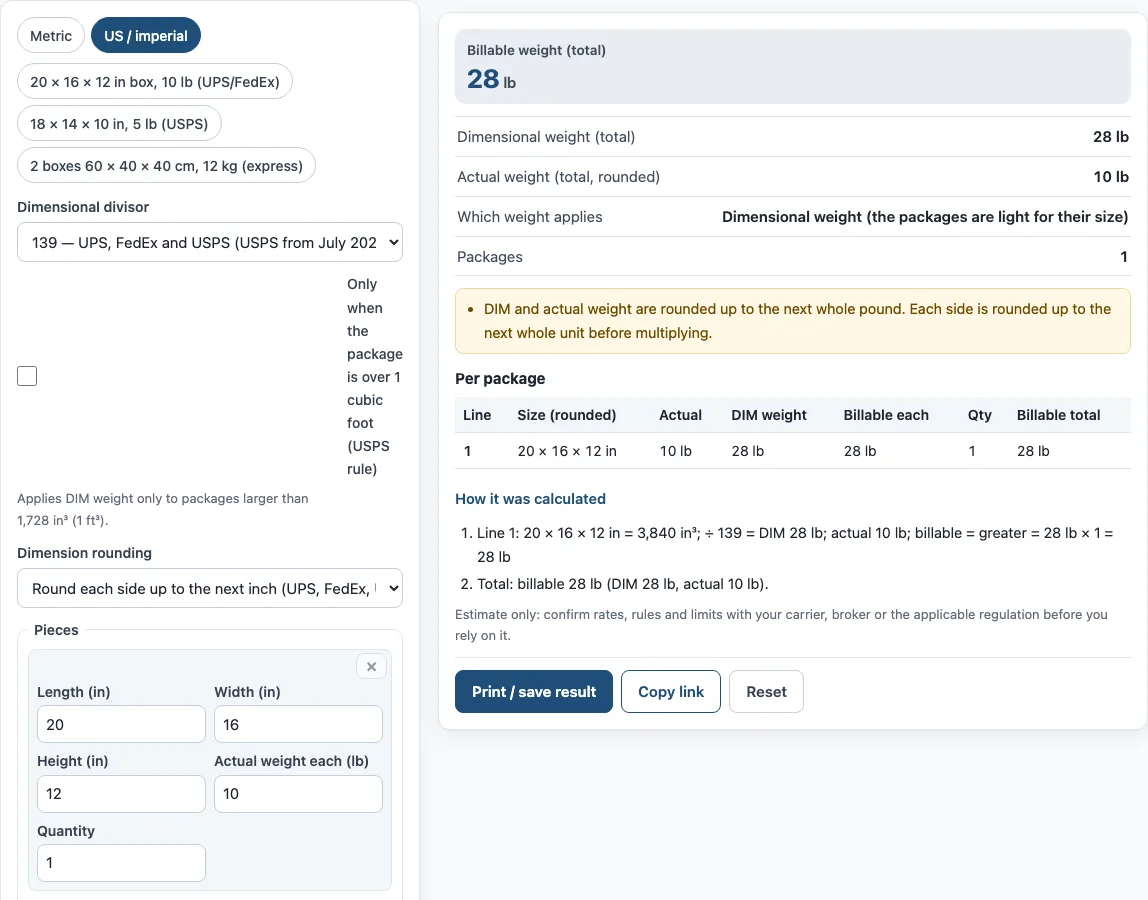
How to use the Dimensional Weight Calculator
- Choose a unit: “Metric” or “US / imperial”. Any typed values convert when you switch.
- Set the dimensional divisor. In inches, pick “139 — UPS, FedEx and USPS (USPS from July 2026)” or “166 — older USPS rule and some retail or contract rates”. In metric, pick “5,000 cm³/kg — international express (DHL, UPS, FedEx)”, “6,000 cm³/kg — air freight (IATA)” or “4,000 cm³/kg”. For any other figure, choose “Custom” and type the number your carrier states.
- If you ship with USPS and want the rule for large parcels only, tick “Only when the package is over 1 cubic foot (USPS rule).”
- Choose dimension rounding. In inches, pick “Round each side up to the next inch (UPS, FedEx, USPS)”, “Round to the nearest inch” or “No rounding”. In metric, pick “No rounding” or “Round each side up to the next whole cm”.
- Enter each package on its own line: Length, Width, Height, Actual weight each and Quantity.
- Select “+ Add a package size” for another box size. Select × to remove a line.
- Read the results: Billable weight (total), Dimensional weight (total), Actual weight (total, rounded), Which weight applies and Packages. The Per package table shows the same figures for each line.
Three preset buttons fill in common examples. Under the result, “How it was calculated” lists each step with your numbers. “Copy link” gives a link that reopens the same inputs, “Print / save result” prints a one-page sheet with the inputs, results, steps and date, and “Reset” restores the example values.
What is dimensional weight?
Dimensional (DIM) weight, also called volumetric weight, prices a parcel by the space it takes up as well as how heavy it is. A carrier multiplies length, width and height to get volume, then divides by a divisor to turn that volume into a weight. Carriers charge the billable weight, which is the greater of the actual weight and the DIM weight.
This means a large box holding a light item can cost more than its actual weight suggests. A parcel that is dense and compact is usually billed on its real weight. The DIM rule exists so that bulky items, which fill up vehicles and aircraft, pay for the room they use.
How do you calculate dimensional weight?
Measure the outside of the box in one unit, then multiply length × width × height to get the volume. Divide that volume by the divisor for your carrier and unit. In inches and pounds, a 20 × 16 × 12 in box has a volume of 3,840 in³, and 3,840 ÷ 139 gives about 27.6 lb.
Carriers round the sides before they multiply: UPS and FedEx since 2025, and USPS since July 2026, round each side up to the next whole inch. The final weight is then rounded up to the next whole pound. For example, a 12.2 × 10.1 × 8 in box becomes 13 × 11 × 8 in, which is 1,144 in³. Divided by 139, that gives 8.23, so the parcel is billed as 9 lb if its actual weight is below that figure.
In centimetres and kilograms, the volume is divided by the divisor, such as 5,000 or 6,000 cm³ per kg, and the result is rounded up to the next 0.5 kg. Always check which divisor your carrier applies, because the same box can give different DIM weights under different divisors.
How do I determine which weight a carrier will bill?
To determine the billable weight, compute the volumetric weight of each package, round the actual weight the same way, and take the larger of the two. With a 20 × 16 × 12 in box weighing 10 lb at divisor 139, the DIM weight of 27.6 rounds up to 28 lb, which is higher than 10 lb, so you pay for 28 lb. The tool does this for every line and shows the totals.
Sources
Data and rules used by this tool (checked October 2026):
Frequently asked questions
What DIM divisor do UPS, FedEx and USPS use?
UPS and FedEx use 139 for daily rates in inches and pounds. USPS also uses 139 from July 12, 2026, but only for packages larger than 1 cubic foot (1,728 in³). The older USPS factor was 166, which still appears in some retail or contract rates.
What is the difference between DIM weight and billable weight?
DIM weight is the weight a parcel’s size produces, and billable weight is the figure the carrier charges. Billable weight is the greater of the DIM weight and the actual weight. The tool’s “Which weight applies” line shows which of the two was used.
How do I lower the dimensional weight of a parcel?
Use the smallest box that still fits the item safely, because DIM weight falls as volume falls. Because sides are rounded up to the next whole inch, trimming a side to just under a whole number can reduce the result. Enter the new sizes in the tool to compare the DIM weight before you pack.
Why does the tool note say the result is an estimate?
Carriers can use negotiated rates, different divisors and their own rules. Confirm the figures with your carrier, broker or the applicable regulation before you rely on them. The custom divisor option lets you match a rate your carrier has given you.
Can I use the results in a quote or invoice?
Yes. Results may be used in commercial work, such as quotes, invoices and shipping plans, without attribution. Use “Print / save result” to keep a dated record of the inputs and steps.
Is my data uploaded anywhere?
No. The tool runs in your browser, and nothing you type is uploaded. It is free, and you do not need an account or sign-up to use it.
Related tools
- CBM calculator: use it to work out cubic metres from length, width and height when you need volume rather than a DIM weight.
- CBM to CFT converter: use it to convert a cubic metre figure into cubic feet.
- CBM to kg calculator: use it to estimate a weight in kilograms from a cubic metre volume.
- Cubic feet calculator for shipping: use it to measure the cubic feet a shipment takes up.
- Chargeable weight calculator: use it to find the chargeable weight of a shipment when you need the figure a carrier bills.
- Freight class calculator: use it to find the freight class for less-than-truckload shipments.