Freight Class Calculator
Enter each pallet or piece with its weight to get the shipment density and its NMFC freight class.
This freight class calculator estimates the NMFC freight class, from 50 to 500, for a shipment based on the size and weight of its pallets, crates or cartons. It works out the density and shows the class on the 2025 density scale, along with the class on the older 18-class guideline for comparison. The tool runs in your browser, is free, needs no account or sign-up, and does not upload anything you type. Treat the result as an estimate, because the carrier makes the final call on class.
Use it as a freight class estimator before you book: determining the freight class from density works the same for FedEx Freight and every other LTL carrier that uses the NMFC.
At a glance
Freight Class Calculator estimates the NMFC freight class, from 50 to 500, for a shipment from its handling units' size and weight. It shows density and the class on the 2025 13-step scale, plus the older 18-class guideline for comparison.
- Estimates NMFC freight class from 50 to 500 for pallets, crates or cartons.
- Shows density in lb/ft³ and the class on the 2025 13-step density scale.
- Also shows the class on the older 18-class density guideline for comparison.
- Free, runs in the browser, and needs no account or sign-up.
- Does not upload typed inputs and does not look up NMFC item numbers.
- Results are estimates; the carrier makes the final class decision.
Sources: National Motor Freight Classification (Wikipedia) (checked 2026-10-15)
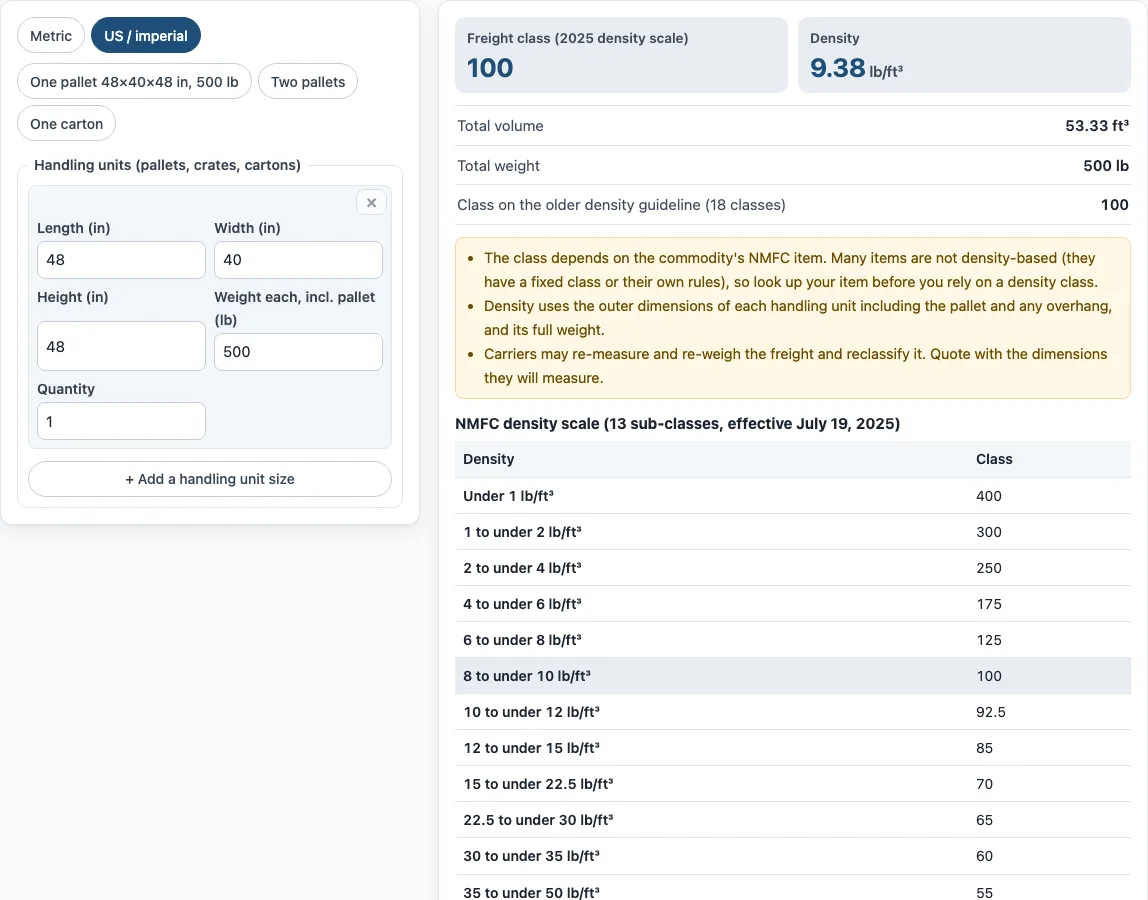
How to use the Freight Class Calculator
- Pick your units with the unit switch: “Metric” or “US / imperial”. Any values you have already typed are converted when you switch.
- In the handling units section, enter one line for each size of pallet, crate or carton. Type the Length, Width and Height in cm or in.
- Enter the Weight each, including the pallet, in kg or lb.
- Enter the Quantity of identical units on that line.
- Select “+ Add a handling unit size” to add a line for another size. Select × to remove a line.
- To start quickly, select a preset: “One pallet 48×40×48 in, 500 lb”, “Two pallets” or “One carton”.
- Read the results: Freight class (2025 density scale), Density, Total volume, Total weight (plus m³, kg and kg/m³ in metric mode), and the class on the older density guideline (18 classes).
- Open “How it was calculated” under the result to see each step with your own numbers.
Select “Print / save result” to print a one-page sheet with your inputs, results, calculation steps and the date. Save it as a PDF from the print dialog. “Copy link” copies a link that reopens the same inputs, and the page address keeps your inputs after any change. “Reset” restores the example values.
How do you figure freight class?
Freight class is the NMFC class that US less-than-truckload (LTL) carriers use to price shipments. For many commodities, you find the class by calculating the shipment’s density and matching it to a band on the density scale.
Work through it in this order. Measure each handling unit, including the pallet, at its outermost points. Weigh each unit. Multiply each line by its quantity, add the totals, and divide the total weight by the total cubic feet. Then find the band that contains that density.
What is NMFC freight class?
NMFC stands for National Motor Freight Classification. It is published by the NMFTA (National Motor Freight Traffic Association) and sorts freight into classes from 50 to 500. Lower classes are cheaper per pound, so a shipment’s class affects its cost.
Not every commodity is classed by density. Some NMFC items have a fixed class or their own rules, so the NMFC item for your product decides how it is classed.
How do you calculate freight density?
Density is the total weight in pounds divided by the total cubic feet. Cubic feet are found by multiplying length, width and height in inches, then dividing by 1,728 (the number of cubic inches in a cubic foot).
Using the example pallet of 48 × 40 × 48 in weighing 500 lb: 48 × 40 × 48 = 92,160 in³, and 92,160 ÷ 1,728 = 53.33 ft³. Then 500 lb ÷ 53.33 ft³ = 9.38 lb/ft³. For a mixed load, add the volume and weight of every line, including quantities, before you divide.
What changed in the 2025 NMFC density scale?
Since July 19, 2025 (NMFC Docket 2025-1), the standard density scale has 13 steps instead of the older layout. Each range includes its lower bound:
- Under 1 lb/ft³: class 400
- 1 to under 2: class 300
- 2 to under 4: class 250
- 4 to under 6: class 175
- 6 to under 8: class 125
- 8 to under 10: class 100
- 10 to under 12: class 92.5
- 12 to under 15: class 85
- 15 to under 22.5: class 70
- 22.5 to under 30: class 65
- 30 to under 35: class 60
- 35 to under 50: class 55
- 50 or more: class 50
Some carriers and brokers still quote the older guideline, which has 18 classes from 500 down to 50, including 77.5, 110, 150 and 200. This tool shows both results so you can compare them.
Can I look up an NMFC code number with this calculator?
No. This calculator does not look up NMFC item numbers. The NMFC, including its item numbers and code lookup, is a licensed NMFTA product (ClassIT). Check the NMFC item for your commodity, because that item decides whether density applies to your freight.
Why did the carrier change my freight class?
Carriers can re-measure and re-weigh freight with dimensioners, then reclass it if the measurements differ from what was declared. Reclassing can lead to correction charges. Measure at the outermost points of each unit, including the pallet, and weigh each unit as it will ship to reduce the chance of a change.
Sources
Data and rules used by this tool (checked October 2026):
Frequently asked questions
Is this freight class calculator free to use?
Yes. It is free, runs in your browser, and needs no account or sign-up.
Does the tool upload my measurements or weights?
No. Nothing you type is uploaded.
Which density scale does the main result use?
The main result, Freight class (2025 density scale), uses the 13-step scale effective July 19, 2025. The class on the older density guideline (18 classes) is shown separately for comparison.
Should I include the pallet in the size and weight?
Yes. Measure each handling unit including its pallet, and weigh it including the pallet, so the density reflects the freight as it ships.
Can I use the results on quotes, invoices or shipping plans?
Yes. Results may be used in commercial work such as quotes, invoices and shipping plans without attribution. Confirm rates and rules with your carrier, broker or the applicable regulation before you rely on them.
What does “estimate only” mean for my result?
The result is an estimate. The carrier applies the final class, and it can re-measure and reclass the freight if the measurements differ.
Can I change between metric and US units without retyping?
Yes. Typed values are converted when you switch the unit setting between “Metric” and “US / imperial”.
Related tools
- CBM calculator: Use it to find the cubic metre volume of a shipment when your measurements are in metric.
- CBM to CFT converter: Use it to convert a cubic metre volume into cubic feet.
- CBM to kg calculator: Use it to estimate weight from a cubic metre volume.
- Cubic feet calculator for shipping: Use it to work out the cubic feet of a box or pallet for shipping.
- Dimensional weight calculator: Use it to find the dimensional weight that a carrier may charge for a package.
- Chargeable weight calculator: Use it to compare actual weight with dimensional weight and find the billable weight.
- Pallet calculator: Use it to plan how items fit on a pallet before you measure the handling unit.
- Pallets in a container: Use it to estimate how many pallets fit in a shipping container.