IFTA Calculator
Enter miles driven and fuel bought in each jurisdiction with this quarter's rates to estimate the IFTA tax due or credit.
At a glance
IFTA Calculator is a free browser tool that takes miles, taxable miles, tax-paid gallons and tax rate for each jurisdiction and returns the fleet MPG, taxable gallons and the net tax due or credit for a quarterly IFTA return.
- Taxable gallons equal taxable miles ÷ fleet MPG, then the tax-paid gallons bought there are subtracted.
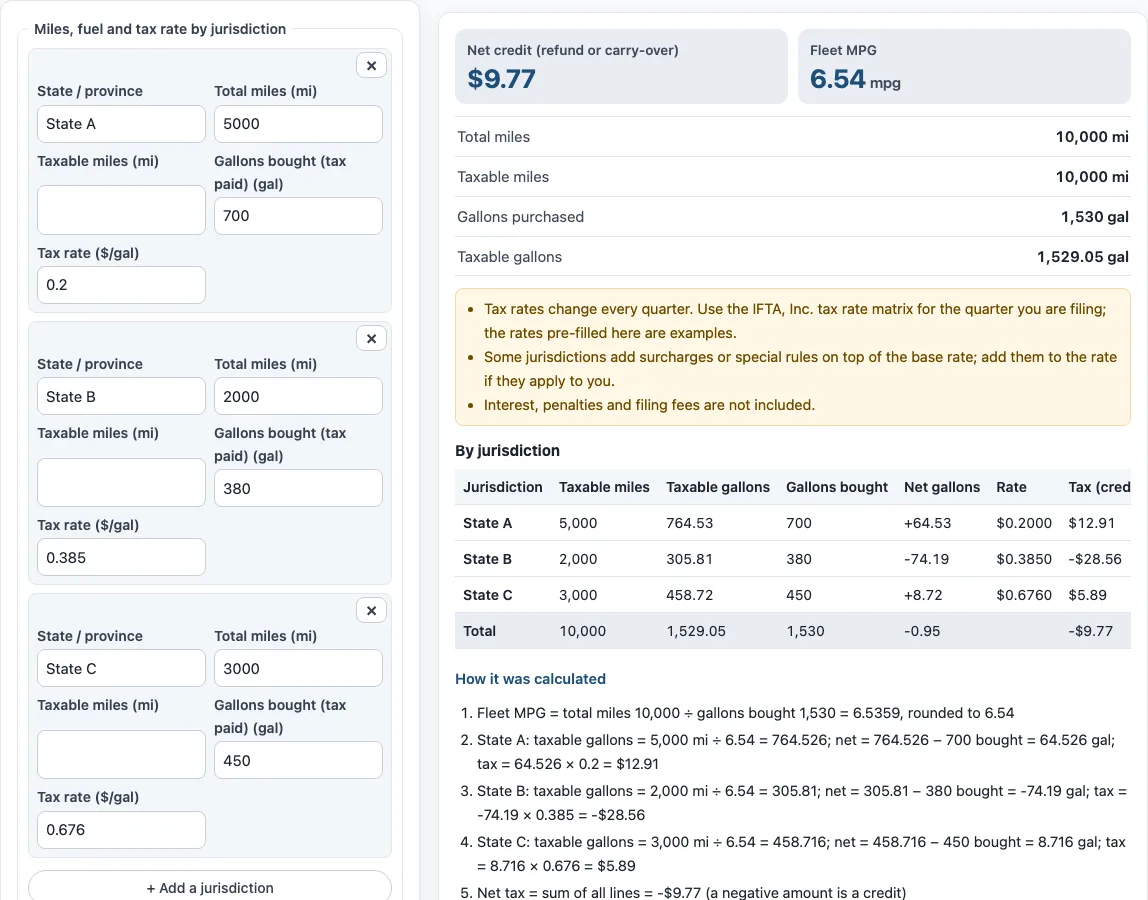
- In State A, 5,000 taxable miles ÷ 6.54 = 764.526 taxable gallons, minus 700 bought, gives 64.526 gallons, or $12.91 owed at $0.20.
- Fleet MPG is total miles ÷ total gallons, so 10,000 ÷ 1,530 = 6.5359, which rounds to 6.54 mpg.
- The default example adds up to -$9.77, which the tool shows as a net credit.
- The tool does not include surcharges, interest, penalties or fuel types other than the one you enter.
Sources: International Fuel Tax Agreement (IFTA) (checked 2026-10-15) · Idaho IFTA Reporting: Step 1 (Idaho State Tax Commission) (checked 2026-10-15)
How to use the IFTA calculator
- For each state or province you drove in, type its name in State / province. The pre-filled rows (State A, B and C) are examples, so replace them with your own.
- Enter the miles you drove there in Total miles (mi).
- Enter the miles you drove there that are taxable in Taxable miles (mi).
- Enter the gallons you bought there with tax paid in Gallons bought (tax paid) (gal).
- Enter that jurisdiction’s rate in Tax rate ($/gal), taken from the IFTA tax rate matrix for the quarter you are filing.
- Select + Add a jurisdiction for each additional state or province. Remove a line with ×.
- Leave Round fleet MPG to 2 decimals checked to match most return forms, or uncheck it to see the unrounded figure.
- Read Net tax due or Net credit, along with fleet MPG, total and taxable miles, gallons purchased, taxable gallons, and the By jurisdiction table.
- Open How it was calculated under the result to check each step against your numbers.
Select Print / save result to print a one-page sheet with your inputs, results, calculation steps and the date. Choose save as PDF in the print dialog to keep a copy. Copy link copies a link that reopens the same inputs, and the page address keeps your inputs after every change. Reset restores the example values.
How is IFTA tax calculated?
IFTA tax is worked out separately for each jurisdiction, then the lines are added together into one net figure for the quarter. Each line uses the same steps: divide taxable miles by fleet MPG to get taxable gallons, subtract the tax-paid gallons you bought there, then multiply the result by that jurisdiction’s tax rate.
Fleet MPG is the same for every jurisdiction, which is why it is calculated first. A positive net taxable gallons figure means you used more fuel there than you bought with tax paid, so you owe tax. A negative figure means you bought more than you used, so that line produces a credit.
The default values show how this works. In State A, 5,000 taxable miles ÷ 6.54 = 764.526 taxable gallons, minus 700 bought gives 64.526 gallons, and at $0.20 that is $12.91 owed. In State B, 2,000 taxable miles gives 305.81 taxable gallons, minus 380 bought gives -74.19 gallons, and at $0.385 that is -$28.56. State C produces $5.89 owed. Adding the three lines gives -$9.77, a net credit.
IFTA lets a qualified motor carrier file one quarterly return in its base jurisdiction for all the US states and Canadian provinces it drove in. The base jurisdiction then shares the tax out, so this single net figure is what the return reports.
What is fleet MPG on an IFTA return?
Fleet MPG is your total miles across all jurisdictions divided by your total gallons bought, for the whole fleet and the whole quarter. It gives one average fuel economy figure that converts taxable miles into taxable gallons everywhere.
In the default example, 10,000 miles ÷ 1,530 gallons = 6.5359, which rounds to 6.54 mpg. Most return forms round fleet MPG to two decimals, so the rounded value is the one used in the steps above.
What are taxable miles?
Taxable miles are the miles you drove in a jurisdiction on which it charges fuel tax. Usually they equal the total miles there, which is why the tool copies the total when you leave the field empty. Enter a lower figure only when the jurisdiction’s rules exempt some of your miles from its fuel tax.
Sources
Data and rules used by this tool (checked October 2026):
Frequently asked questions
Where do I find IFTA tax rates?
Rates change every quarter, so take them from the IFTA, Inc. tax rate matrix for the quarter you are filing. The rates in the pre-filled rows (State A, B and C) are examples only and are not real rates.
What does a negative IFTA amount mean?
A negative amount is a credit. A negative line for one jurisdiction means you bought more tax-paid fuel there than your taxable miles used. The total Net credit (refund or carry-over) is the amount the quarter shows in your favour.
When are IFTA returns due?
Returns are due on the last day of the month after each quarter: April 30, July 31, October 31 and January 31.
What is left out of the result?
The tool does not include surcharges some jurisdictions add, interest and penalties, or fuel types other than the one you enter. Add these yourself if they apply to your return.
Is my data uploaded or stored?
Nothing you type is uploaded. The calculator runs in your browser, is free, and needs no account or sign-up.
Can I rely on this result for my official return?
The result is an estimate. Confirm rates, rules and limits with your carrier, broker or the applicable regulation before you rely on it.
Related tools
- Trucking cost per mile calculator: Use it to see what each mile costs you to run before you price a load.
- Fuel surcharge calculator: Use it when you need to work out a fuel surcharge for a shipment.
- Truck driver pay calculator: Use it to estimate gross pay for a driver based on miles or hours.
- Axle weight calculator: Use it to check how a load is spread across the axles.
- Bridge formula calculator: Use it to check whether a truck’s axle spacing and weight meet the bridge formula.
- Truck loading calculator: Use it to plan how much cargo fits in a trailer.