Incoterms Chart
Pick an Incoterms® 2020 rule to see who pays each step of the shipment and where the risk passes; print the full table.
At a glance
Incoterms Chart is a free browser tool that shows which costs and risks the seller and buyer take under each of the 11 Incoterms 2020 rules, with a printable table.
- Shows which costs and risks the seller and buyer take under each of the 11 Incoterms 2020 rules.
- Splits each rule into 12 cost steps, from export packaging to import duties and taxes.
- Free, runs in your browser, and needs no account or sign-up; nothing you type is uploaded.
- Chart marks S for seller, B for buyer, and a dash where a step is not required.
- Results are estimates; confirm details before you sign a contract.
- Print / save result makes a one-page sheet with inputs, results, calculation steps and the date.
Sources: Incoterms (Wikipedia) (checked 2026-10-15) · Incoterms 2020 (ICC) (checked 2026-10-15)
How to use the Incoterms chart
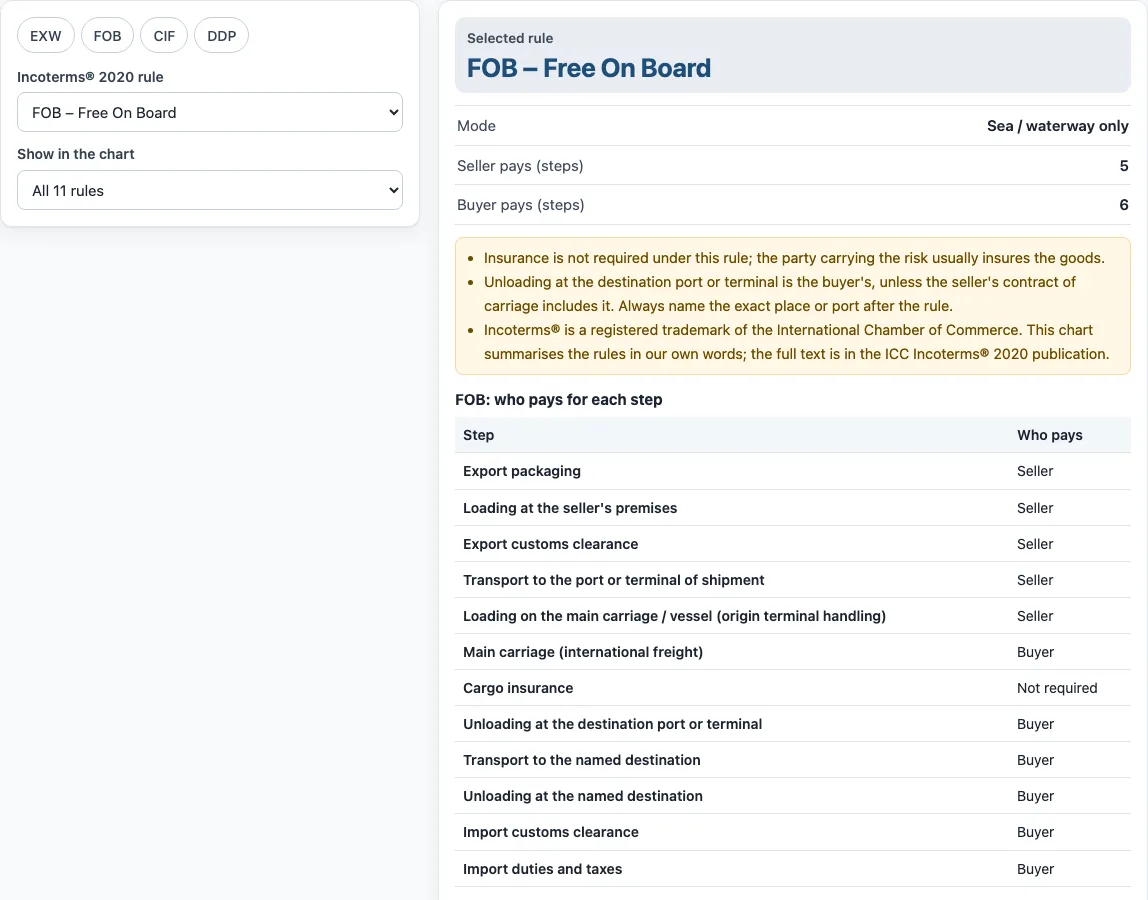
- Choose one of the 11 rules, from EXW – Ex Works to DDP – Delivered Duty Paid. Or press a preset button: EXW, FOB, CIF or DDP.
- Set Show in the chart to All 11 rules, Sea and inland waterway rules only, or Rules for any mode of transport.
- Read the Selected rule and Mode lines. Mode tells you whether the rule suits any transport or only sea and inland waterway.
- Check Seller pays and Buyer pays: how many of the 12 steps each party handles and pays. The table “who pays for each step” lists them one by one.
- Scan the chart table. S marks the seller, B marks the buyer and – marks a step that is not required. The column marked ▸ is your selected rule.
- Open How it was calculated under the result to read where the risk passes and which steps each party pays.
The page opens on the FOB example. Reset restores these example values at any time.
Print / save result prints a one-page sheet with the inputs, results, calculation steps and the date. To keep a copy, choose Save as PDF in the print dialog. Copy link copies a link that reopens the same inputs, and the page address keeps your inputs after each change.
What are the Incoterms 2020 rules?
Incoterms 2020 are 11 rules published by the International Chamber of Commerce (ICC). Each rule sets out which costs and risks the seller and the buyer take in a sale of goods. Incoterms® is a registered trademark of the ICC, and this chart summarises the rules in its own words.
The rules come in two groups. Seven work for any mode of transport: EXW, FCA, CPT, CIP, DAP, DPU and DDP. Four are for sea and inland waterway transport only: FAS, FOB, CFR and CIF. A sea-only rule does not suit containers or other modes, so use FCA, CPT, CIP or a D rule for those shipments.
Each rule answers two separate questions: where risk passes from seller to buyer, and which party pays each cost. The answers differ from rule to rule, which is why comparing them in a chart is useful.
Who pays freight under FOB and CIF?
Under FOB, the seller pays for everything up to loading the goods on board the ship at the named port of shipment. That covers export packaging, loading at the seller’s premises, export clearance, transport to the port and loading on the vessel. The buyer pays the main sea freight, unloading at the destination port, onward transport, import clearance, and import duties and taxes. Risk passes to the buyer once the goods are on board.
Under CIF, the seller pays the freight to the destination port and minimum insurance under Institute Cargo Clauses C. The cost split is different, but risk still passes when the goods are on board at the port of shipment. The buyer therefore carries the risk of loss during the voyage, even though the seller paid for the freight and insurance. The buyer still pays for unloading, import clearance and duties.
Under DDP the seller carries the most cost and risk; under EXW the buyer does.
Sources
Data and rules used by this tool (checked October 2026):
Frequently asked questions
Where does risk transfer under each Incoterm?
Risk passes at a different point under each rule. EXW passes at the seller’s premises before loading, FCA when the goods are handed to the buyer’s carrier, and FAS alongside the ship. FOB, CFR and CIF pass once the goods are on board at the port of shipment, CPT and CIP when they are handed to the first carrier, DAP when they are ready for unloading at the named destination, DPU after unloading there, and DDP at the destination, cleared for import with duties paid.
What is the difference between DAP, DPU and DDP?
All three deliver the goods to a named destination, but they differ on who unloads and who clears import. Under DAP the seller delivers the goods ready for unloading, and the buyer unloads them and handles import duties. Under DPU the seller also unloads the goods at the destination, so the buyer only handles import. Under DDP the seller also clears the goods for import and pays the duties and taxes, but the buyer still unloads.
Are there Incoterms 2022?
No. Incoterms 2020 is the current edition, and there are no 2021 or 2022 versions. A chart labelled incoterms 2022 or incoterms 2021 should show the 2020 rules. A 2010 incoterms chart is older and lists DAT (Delivered at Terminal), which DPU replaced in 2020.
Which Incoterms require insurance?
Only CIF and CIP make anyone buy insurance. CIF requires the seller to insure at minimum cover (Institute Cargo Clauses C), while CIP requires broader cover (Clauses A). Under the other rules, the party carrying the risk at the time usually arranges its own insurance.
Can I print or save the incoterms chart as a PDF?
Yes. The page prints the table for one rule or the full table for all rules. For a one-page sheet with your inputs, results, calculation steps and the date, use Print / save result and choose Save as PDF in the print dialog.
Can I use the results in a quote or contract?
Results can be used in commercial work such as quotes, invoices and shipping plans without attribution. The tool gives an estimate only, so confirm rates, rules and limits with your carrier, broker or the applicable regulation before you rely on them.
Related tools
- Import duty calculator: use it to estimate the duty on imported goods once you know the rule that applies.
- Landed cost calculator: use it when you want the total cost of goods delivered to your door.
- CBM calculator: use it to work out the volume of cargo in cubic metres for a shipping plan.
- Chargeable weight calculator: use it to compare actual and volume weight before you book freight.
- Shipping container dimensions: use it to check the internal size of a container before you load cargo.