Pallet Calculator
Enter the box size and weight and the pallet limits to get boxes per layer, layers and the total per pallet.
A pallet calculator works out how many cartons fit on a pallet, and how tall and heavy the finished load will be. Enter your pallet size, box dimensions, box weight and the limits from your carrier or warehouse, and the tool shows the boxes per pallet, the layer pattern and which limit stopped the count. It runs in your browser, is free, and needs no account or sign-up. Nothing you type is uploaded. The result is an estimate, so confirm rates, rules and limits with your carrier, broker or the applicable regulation before you rely on it.
It works as a pallet estimator and load configuration tool: pattern optimization tries straight, turned and two-block layer layouts, then reports the layers and units per layer, the same figures a pallet stacking schema lists.
At a glance
Pallet Calculator is a free browser tool that estimates how many cartons fit on a pallet, plus the load height, gross weight, layer pattern and which limit applies.
- The tool runs in your browser, is free, and needs no account or sign-up.
- Pallet size presets include 48 × 40 in (GMA) and 1200 × 800 mm (EUR / EPAL 1); Custom size is also available.
- Typical load height limits are 60 in for LTL and container loads, and trailer height for full truckloads.
- The result is an estimate, so confirm limits with your carrier, broker or the applicable regulation.
- Nothing you type is uploaded.
- Results show Boxes per pallet, Ti × Hi, Load height, Gross weight, Layer pattern and Limited by.
Sources: Pallet (Wikipedia) (checked 2026-10-15)
How to use the Pallet calculator
- Choose a unit: Metric or US / imperial. Values you have typed are converted when you switch.
- Pick a Pallet size from the list, such as 48 × 40 in (GMA, North America) or 1200 × 800 mm (EUR / EPAL 1). For any other pallet, choose Custom size and fill in Pallet length and Pallet width.
- Enter the Box length, Box width and Box height.
- Enter the Box weight. Leave it at 0 to ignore the weight limit.
- Enter the Maximum load height (including the pallet). Typical limits are 60 in for LTL and container loads, and trailer height for full truckloads.
- Enter the Maximum gross weight (including the pallet). A common limit for a single pallet is 2,500 lb or 1,000 kg, but check with your carrier or warehouse.
- Open More options to set the Pallet deck height, Empty pallet weight and Overhang allowed on each side. Leave the overhang at 0 unless you must use it.
- Tick Keep boxes this side up if the boxes must stay upright.
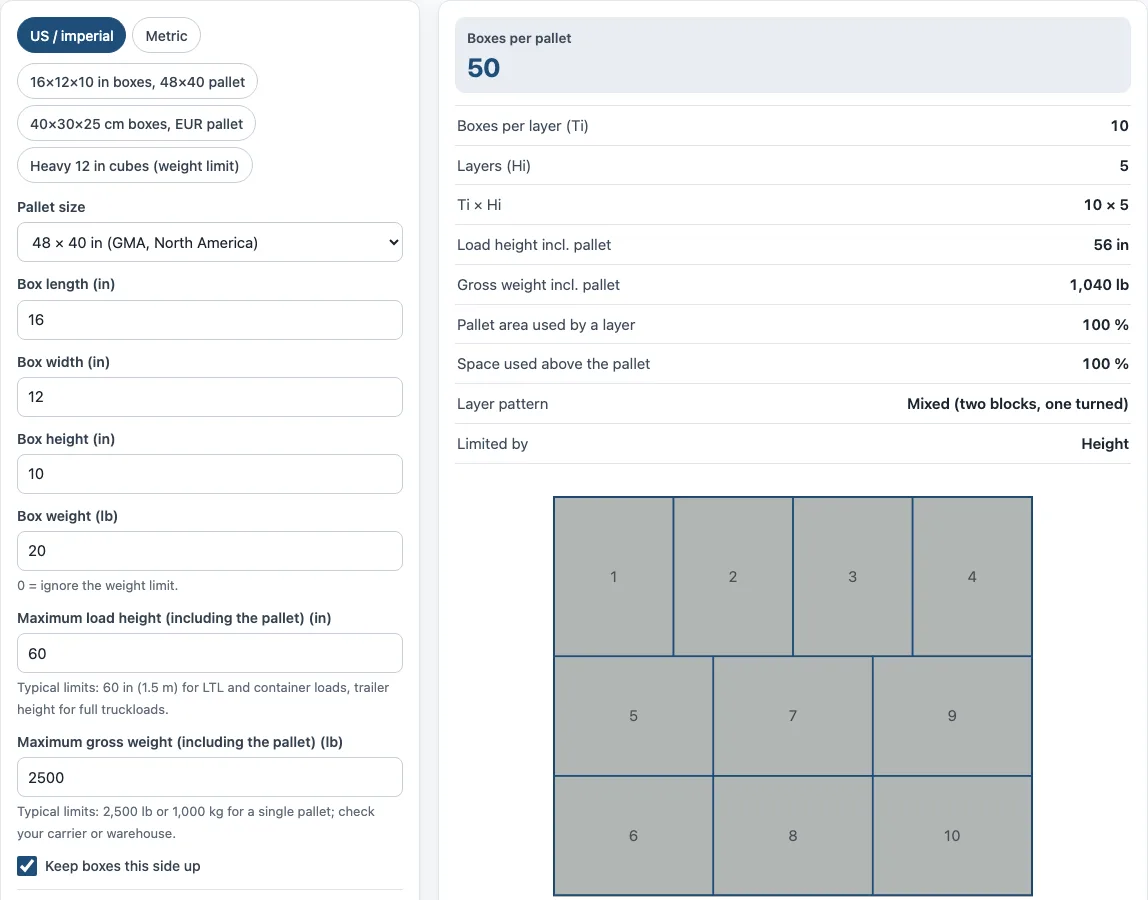
- Read the results: Boxes per pallet, Ti × Hi, Load height incl. pallet, Gross weight incl. pallet, Layer pattern and Limited by.
The three preset buttons fill in example boxes and pallets so you can see how the fields work. Under the result, How it was calculated lists each step with your numbers. Print / save result creates a one-page sheet you can save as a PDF from the print dialog. Copy link copies a link that reopens the same inputs, and Reset restores the example values.
How many boxes fit on a pallet?
The tool counts boxes in layers. For each layer, it tries the box both ways round on the pallet and also two-block patterns, where part of the layer is turned 90°. It keeps the arrangement that fits the most boxes. That number is the boxes per layer, called Ti.
The number of layers, called Hi, comes from height: (maximum load height − pallet deck height) ÷ box height, rounded down. If the boxes plus the pallet would exceed the gross weight limit, the count is cut further. The weight allowance is (maximum gross weight − empty pallet weight) ÷ box weight, rounded down.
Take the default example. The deck is 6 in and the maximum height is 60 in, so there are 54 in of room. Boxes 10 in high give 54 ÷ 10 = 5.4, which rounds down to 5 layers. The best layer is 10 boxes with a 16 × 12 in footprint in a mixed pattern. That gives 10 × 5 = 50 boxes. The load height is 6 + (5 × 10) = 56 in. The weight allowance is (2,500 − 40) ÷ 20 = 123 boxes, which is more than 50, so height is the limit. The gross weight is 40 + (50 × 20) = 1,040 lb.
Area use is the box footprint area per layer divided by the pallet area. In the example it is 100%, so the layer uses the whole pallet top. Cube use is the boxes’ total volume divided by the pallet footprint times the load height. It shows how much of the space above the pallet the boxes fill.
What does Ti-Hi mean?
Ti-Hi is a shorthand for a pallet pattern. Ti is the number of boxes on one layer, and Hi is the number of layers stacked on top of each other. Boxes per pallet equals Ti × Hi, so a pattern of 8 boxes per layer and 5 layers is written 8 × 5 and holds 40 boxes.
The tool prints Ti × Hi in its results so you can compare patterns quickly. The Limited by line then tells you whether height, weight or the pallet footprint set the final count. If the limit is weight, adding height will not add boxes, and if it is height, adding weight allowance will not help.
Sources
Pallet footprints follow ISO 6780 (plus the GMA 48 × 40 in size); height and weight limits are your inputs:
Frequently asked questions
What is the standard pallet size?
There is no single worldwide standard. Common sizes include 48 × 40 in (GMA, North America), 1200 × 800 mm (EUR / EPAL 1), 1200 × 1000 mm (EUR 2, UK), 1100 × 1100 mm (Asia) and 1165 × 1165 mm (Australia). These sizes are listed in ISO 6780. For any other size, choose Custom size.
How high can you stack a pallet?
Set the Maximum load height (including the pallet) to the limit that applies to your route. Typical limits are about 60 in in the US for LTL and racking, and around 1.5 to 1.8 m in Europe. Full truckloads are limited by trailer height. Always check the warehouse, racking and carrier limits.
Can boxes overhang the pallet?
Boxes that hang over the pallet edge crush easily, and many carriers refuse them. The overhang field is 0 by default. Only enter a value if you must, and confirm with your carrier first.
What happens if the weight limit is reached before the height limit?
The tool cuts the box count to the weight allowance, and the Limited by result shows Weight. The load height then shows only the layers that fit under the weight limit. Lowering the box weight or raising the gross weight limit may allow more boxes, if your carrier permits it.
Does the tool work in metric and imperial units?
Yes. Use the unit switch to choose Metric or US / imperial. Values you have typed are converted when you switch, so you can check the same load in either system.
Can I use the results in a quote or shipping plan?
Yes. Results may be used in commercial work such as quotes, invoices and shipping plans, without attribution. They are still estimates, so confirm the final numbers with your carrier, broker or the applicable regulation.
Related tools
- Pallets in a container: use it to see how many pallets fit inside a shipping container.
- Container loading calculator: use it to plan how boxes or pallets fill a container.
- Shipping container dimensions: use it to check the internal size of a container before you load.
- Truck loading calculator: use it to plan a load for a trailer.
- Freight linear feet calculator: use it to work out the space a shipment takes up on a trailer or in a container.
- Warehouse space calculator: use it to estimate how much storage floor space you need.