Cubic Feet Calculator for Shipping
Enter each piece in inches and pounds to get the shipment's cubic feet, cubic meters and density.
The Shipping Cubic Feet Calculator works out the total volume of a shipment in cubic feet, then adds the cubic metres, total weight and density in pounds per cubic foot. You enter the length, width, height, weight and quantity of each piece, and the tool does the rest. It runs in your browser, is free, and needs no account or sign-up. Nothing you type is uploaded.
Use it to plan a freight quote, find the density for an LTL freight class, or fill in the volume and density on a shipping document. You can switch between metric and US / imperial units at any time, and typed values convert when you switch. The results are estimates, so confirm rates and rules with your carrier before you rely on them.
At a glance
Cubic Feet Calculator for Shipping is a free browser tool that totals shipment volume in cubic feet and cubic metres, plus total weight and density in pounds per cubic foot.
- Calculates total volume in cubic feet and cubic metres, total weight, and density in pounds per cubic foot (pcf).
- Converts cubic inches to cubic feet by dividing by 1,728.
- Switches between Metric and US / imperial units; typed values convert when you switch.
- Free, runs in your browser, and needs no account or sign-up. Nothing you type is uploaded.
- Results are estimates, so confirm rates and rules with your carrier before relying on them.
- Default example: a 48 × 40 × 60 in pallet at 800 lb gives 66.6667 ft³ and 12 lb per ft³.
Sources: Cubic foot (Wikipedia) (checked 2026-10-15)
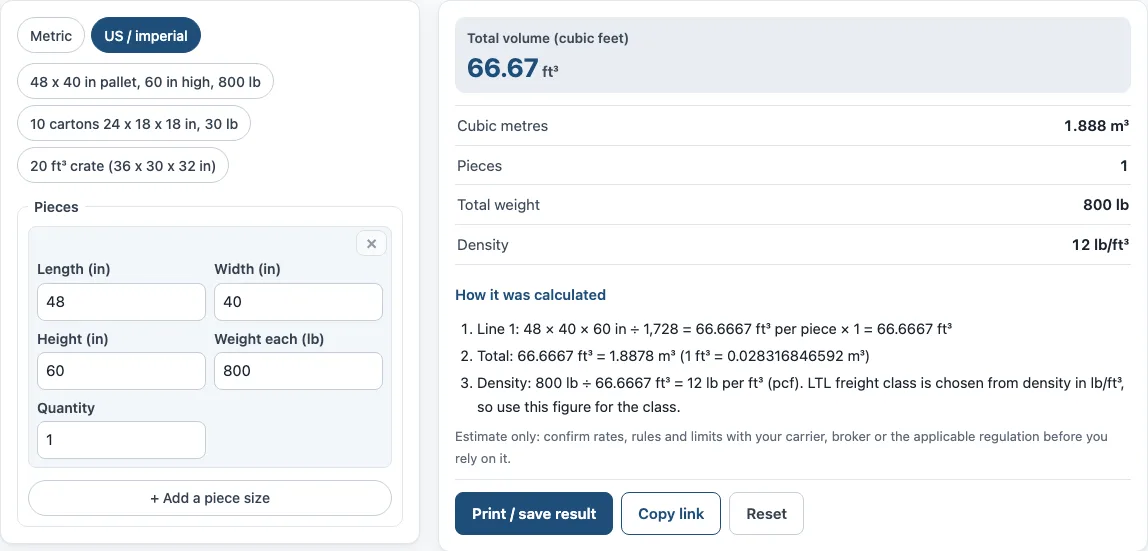
How to use the Shipping Cubic Feet Calculator
- Choose your units with the switch: “Metric” or “US / imperial”.
- In Pieces, enter the Length, Width and Height of the first item, in cm or in.
- Enter the Weight each of that item, in kg or lb.
- Enter the Quantity of identical items.
- For a different piece size, select “+ Add a piece size” and repeat steps 2 to 4 on the new line. To remove a line, select ×.
- Read the results: Total volume (cubic feet), Cubic metres, Pieces, Total weight, Density and Density in pounds per cubic foot (pcf).
- Check “How it was calculated” under the result to see each step with your own numbers.
To start from a sample load, use one of the preset buttons: “48 x 40 in pallet, 60 in high, 800 lb”, “10 cartons 24 x 18 x 18 in, 30 lb”, or “20 ft³ crate (36 x 30 x 32 in)”. “Reset” restores the example values.
“Copy link” copies a link that reopens the same inputs, so you can send the calculation to a carrier or colleague, and the page address keeps your inputs after every change. “Print / save result” prints a one-page sheet with the inputs, results, calculation steps and the date. To keep a PDF, choose save as PDF in the print dialog.
How do you calculate cubic feet for shipping?
Multiply the length, width and height of one piece in inches, then divide by 1,728. The answer is that piece’s volume in cubic feet. For the whole shipment, do this for each piece size, multiply by its quantity, and add the results together.
Measure each piece at its longest, widest and highest points, including the pallet and any overhang. A 48 × 40 × 60 in pallet load gives 115,200 cubic inches, and 115,200 ÷ 1,728 = 66.67 ft³. That is the figure the tool prints as 66.6667 ft³ for one piece.
How do I convert inches to cubic feet?
Divide the cubic inches by 1,728, because one cubic foot is 12 × 12 × 12 = 1,728 cubic inches. You can convert the three sides to feet first and multiply them, or multiply in inches and divide once. Both methods give the same answer.
If your measurements are in centimetres, multiply length, width and height, then divide by 28,316.8. To get cubic metres from cubic feet, multiply by 0.0283168, since 1 ft³ = 0.028316846592 m³.
Why does a freight carrier need the density?
Density is the total weight divided by the total cubic feet, measured in pounds per cubic foot (pcf). Less-than-truckload (LTL) carriers use density to choose the freight class, so two loads with the same volume can fall into different classes if one is much heavier. In the default example, 800 lb ÷ 66.67 ft³ = 12 lb per ft³.
Use the density in lb/ft³ when you choose the class. Ask your carrier how they apply their class rules, because the rules and limits vary.
Do I include the pallet in the measurements?
Yes. Measure the load as it will ship, so the pallet is part of the length, width and height. The default example uses a 48 × 40 in pallet stacked 60 in high, so the height is the full height of the stack on the pallet.
Include the pallet’s weight in the Weight each figure too. Density uses total weight, so leaving the pallet out understates the weight and gives a lower density than the real load.
Sources
Data and rules used by this tool (checked October 2026):
Frequently asked questions
Is the Shipping Cubic Feet Calculator free to use?
Yes. It is free and runs in your browser. You do not need an account or a sign-up.
Is my data uploaded anywhere?
No. Nothing you type into the tool is uploaded.
Can I use the results in a quote, invoice or shipping plan?
Yes. You may use the results in commercial work, such as quotes, invoices and shipping plans, without attribution. They are estimates, so confirm rates, rules and limits with your carrier, broker or the applicable regulation first.
What is the difference between cubic feet and cubic metres?
Both measure volume. A cubic metre is much larger, about 35.3 cubic feet, so the same load shows a smaller number in cubic metres. The tool shows both, so you can match the figure your carrier or supplier uses.
How many cubic feet is a standard pallet?
It depends on how high it is stacked. A 48 × 40 in pallet loaded to 60 in, including the pallet, is 66.67 ft³; at 48 in high it is 53.33 ft³. Press the “48 x 40 in pallet, 60 in high, 800 lb” preset and change the height to see your own load.
Can I enter several box sizes at once?
Yes. Each line is one piece size with its own quantity. Select “+ Add a piece size” for every different box, crate or pallet in the shipment, and the totals add them all together.
Related tools
- CBM calculator: use it when your shipment is measured in cubic metres.
- CBM to CFT converter: use it to convert a cubic metre figure into cubic feet.
- CBM to kg calculator: use it to estimate weight from a cubic metre volume.
- Dimensional weight calculator: use it to find the billed weight for a parcel based on its size.
- Chargeable weight calculator: use it to compare actual and volume weight to find the chargeable weight.
- Freight class calculator: use it to work out the freight class from your density.